
KRL (KUKA Robot Language) is a programming language used to program KUKA industrial robots. It's powerful and flexible, allowing control of the robot's movements, signal processing, interaction with peripheral devices and much more. Below we provide a complete guide to KRL syntax.
1. Basic elements of KRL
- Comments:
Comments start with;and are used for explanations in the code.
Example:

- Variables:
Variables are declared with the keywordDECL.
Example:

- Data types:
INT– integerREAL– floating-point numberBOOL– Boolean value (TRUE/FALSE)CHAR– characterSTRING– stringFRAME– coordinate systemPOS– positionAXIS– robot axes
2. Robot movements
- LIN (linear motion):
Motion in a straight line between two points.
Example:

- PTP (point-to-point motion):
Motion between points without a specific path.
Example:

- CIRC (circular motion):
Motion along an arc through three points.
Example:

3. Program control
- IF-ELSE:
Conditional statements.
Example:

- FOR loop:
Repeating a block of code.
Example:

- WHILE loop:
Repeating while a condition is true.
Example:

- SWITCH-CASE:
Choosing between multiple options.
Example:

4. Functions and procedures
- Defining a function:
Functions are defined withDEF.
Example:

- Calling a function:
Example:

- Function parameters:
Example:

5. Working with signals
- Reading an input signal:
Example:

- Writing an output signal:
Example:

6. Working with tools and coordinate systems
- Defining a tool (TOOL):
Example:

- Defining a coordinate system (BASE):
Example:

7. Error handling
- TRYN-CATCH:
For handling exceptions.
Example:

8. Additional commands
- WAIT:
Pausing program execution.
Example:

- LOOP:
An infinite loop.
Example:

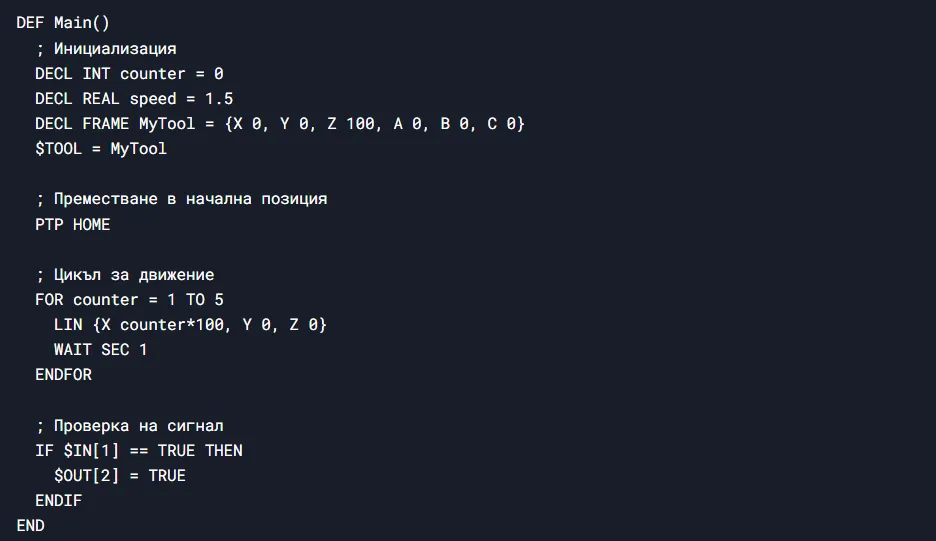
9. Sample program
10. Additional resources
- KUKA OfficeLite: A simulation environment for testing KRL programs.
- KUKA System Software (KSS): Official KRL documentation.
- KUKA College: Training and courses on programming KUKA robots.
KUKA's official website, where you can find documentation, products and contacts, is at https://www.kuka.com/
On the Artec Robotics “News” page you will find a variety of articles and guides on robotics and automation. Here you'll find useful information about the latest technologies, software solutions and programs that will help you dive deeper into the world of industrial robots and automated systems.
Follow the news from Artec Robotics!
MAKE AN INQUIRY
Contact us