Programming KUKA robots with the KRL language
KUKA Robot Language (KRL) is a specialized programming language created by KUKA to control its industrial robots. It's based on a syntax similar to Pascal and provides powerful tools for programming movements, processing signals and interacting with external devices.
Main components of a KUKA robot program
A KUKA robot program consists of several main components:
- Tasks: These are separate parts of the program that perform specific functions. For example, one task might be “pick up the part” and another “place the part on the conveyor”.
- Movements: These are commands that determine how the robot will move from one point in space to another. There can be linear movements, circular movements, movements along complex paths and more.
- Conditions: Conditions let the program make decisions based on certain criteria. For example, the robot can check whether a sensor is activated and, if so, perform a certain sequence of actions.
- Variables: Variables are locations in the robot's memory where different kinds of data are stored. They can take on different values while the program runs.
- Loops:Loops let the program execute a certain sequence of instructions repeatedly. For example, the robot can repeat actions such as “pick up the part” and “place the part” several times.
Data types
KUKA robot programming uses different data types to represent different kinds of information. Some of the main data types are:
- Numbers: Used to represent quantitative values, such as coordinates, speeds, forces, etc.
- Text: Used to represent textual information, such as variable names, messages, etc.
- Boolean values: Can have only two values: True (TRUE) or False (FALSE). Used to represent conditions.
- Arrays: Arrays are data structures that allow multiple values of the same type to be stored.
For example:
- Number: The X coordinate of the point the robot has to move to (e.g. X = 100 mm)
- Text: The name of a variable that stores the robot's current position (e.g. Position)
- Boolean value: The result of checking whether a sensor is activated (e.g. Sensor_Activated = TRUE)
- Array: A list of coordinates that define the robot's path of motion
Structure of a KUKA robot program
Basic program structure
A KUKA robot program is built from a sequence of instructions that define the actions the robot has to perform. To organize the code better and make it easier to understand and maintain, programs are structured into modules, functions and subroutines.
- Modules: These are logically self-contained parts of the program that perform a specific task. Modules can contain multiple functions and subroutines.
- Functions: Functions are subroutines that perform a specific action and return a result. For example, a function might calculate the distance between two points or check whether a sensor is activated.
- Subroutines: Subroutines are similar to functions but don't return a result. They're used to group multiple instructions that are executed repeatedly in the program.
Defining variables and constants
Variables are locations in the robot's memory where data that can change while the program runs is stored. To define a variable, we use the following syntax:
DECL REAL myVariable
Here DECL means “declare”, REAL indicates that the variable is of type “real number”, and myVariable is the name of the variable.
Constants are values that can't be changed while the program runs. To define a constant, we use the following syntax:
CONST REAL pi = 3.14159
Here CONST means “constant”, and pi is the name of the constant.
Program organization
The main program is the point where program execution begins. It contains the main steps the robot has to perform. Subroutines are used to organize the code and carry out repetitive tasks.
Example program structure:
; Main program
MAIN ()
  ; Declare variables
  DECL REAL x, y, z

  ; Call the initialization subroutine
  INIT()

  ; Main program loop
  WHILE TRUE DO
    ; Perform various tasks
    MOVE TO P1
    CALL SUBROUTINE1
    CALL SUBROUTINE2
  ENDWHILE
ENDMAIN

; Initialization subroutine
SUBROUTINE INIT()
  ; Initialize variables and settings
ENDSUB

; Subroutine for task 1
SUBROUTINE SUBROUTINE1()
  ; Code for task 1
ENDSUB

; Subroutine for task 2
SUBROUTINE SUBROUTINE2()
  ; Code for task 2
ENDSUB
In this example:
MAIN()is the main program.INIT()is an initialization subroutine that runs once at the start of the program.SUBROUTINE1()andSUBROUTINE2()are subroutines that perform different tasks.WHILE TRUE DO ... ENDWHILEcreates an infinite loop in which the robot's main tasks are performed.MOVE TO P1is a command that makes the robot move to point P1.CALL SUBROUTINE1andCALL SUBROUTINE2call the corresponding subroutines.
KUKA robot motion instructions
Defining movements
Movements of a KUKA robot are defined with specific commands in the program. These commands determine the type of motion, the target position and other parameters such as speed and acceleration.
Types of motion:
- Linear motion: The robot moves in a straight line between two points in space.
- Circular motion: The robot moves along a circular path around a given axis.
- Point-to-point motion: The robot positions itself at a precisely defined point in space without following a specific path.
- Path motion: The robot follows a predefined path, which can be a combination of linear and circular segments.
Coordinate systems
Various coordinate systems are used to define the position of the robot and of objects in its work area. The most common are:
- Cartesian coordinate system: X, Y and Z axes that intersect at right angles. The position of a point is defined by three coordinates (X, Y, Z).
- Cylindrical coordinate system: Uses radius (R), angle (θ) and height (Z). More convenient for describing circular movements.
- Spherical coordinate system: Uses radius (R) and two angles (θ and φ). Suitable for describing movements in a spherical area.
The choice of coordinate system depends on the specific task and the geometry of the work area.
Setting speeds and accelerations
The speed and acceleration of the robot's movement can be set through various parameters in the program.
- Linear speed: Determines the speed of movement in a straight line.
- Angular speed: Determines the speed of rotation around an axis.
- Acceleration: Determines how quickly the speed of movement changes.
Controlling dynamic characteristics:
By carefully tuning speed and acceleration, the robot's movements can be optimized and overloading of the mechanism avoided. For example, when working with delicate parts, low speeds and accelerations need to be set to prevent damaging them.
Example motion command:
MOVE L P1
This command makes the robot move along a linear path (L) to point P1, which is predefined in the program.
Important: To ensure the robot operates safely and efficiently, its movements need to be carefully planned and programmed.
Look out for the next part of our article “Programming KUKA robots with the KRL language”! In part two we'll dig into conditional constructs and loops, look at how the robot interacts with other devices and introduce the possibilities of offline programming and simulation.
Follow the news from Artec Robotics !
Console
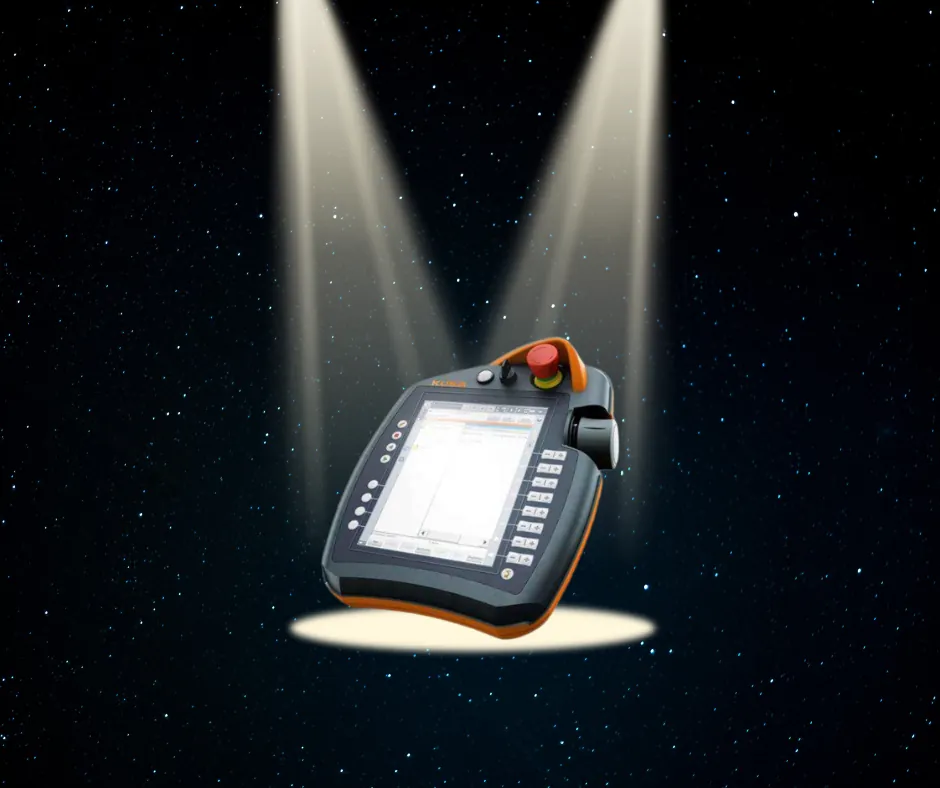
The KUKA robot console is the interface through which operators and programmers interact with the robot, executing commands, setting parameters and monitoring the state of the system, usually via the KUKA SmartPAD programmable controller.
MAKE AN INQUIRY